 Chat XP
Know your raid comp
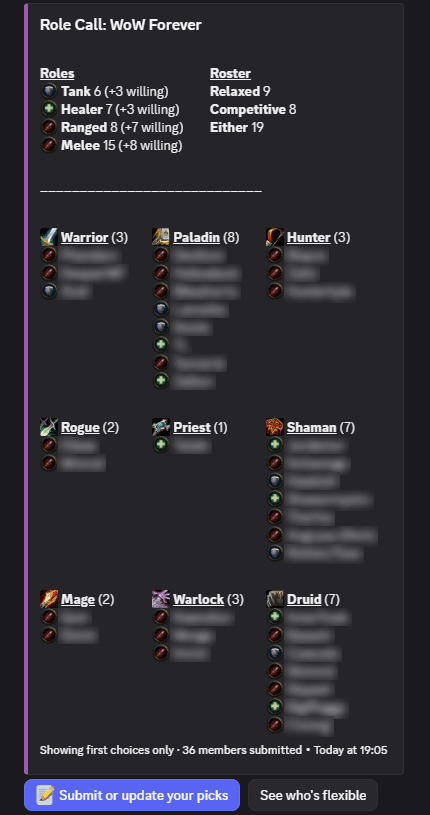
Members press one button to tell you what they plan to play. Role Call shows the answers on a live board. The board shows tanks, healers and DPS by class. Your officers see the gaps early.
Free. No sign-up. Works in all servers. One command to set up.
Set up in two minutes
- 1Add the botClick Add to Discord. Select your guild server. The bot needs only basic channel permissions.
- 2Post the boardRun /role-call board. Select a channel. Pin the message so that members can find it.
- 3Members press the buttonEach member selects up to three class and spec choices, in order. Then they select a roster preference. This takes about 20 seconds.
- 4See the gapsThe board updates after each submission. Empty classes and roles with few members are easy to see.
Made for guild leadership
Five commands. All are optional.
Members do not type commands. These commands are for officers only.
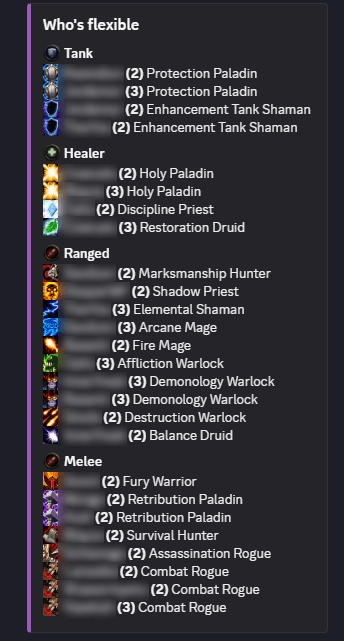
/role-call board channel:#rosterPost the board, or move it to a different channel./role-call gapsShow who is flexible (second and third choices), grouped by role. Add roster: to filter by roster./role-call depth member:@nameShow the full ranked picks and roster preference of one member./role-call leadership add role:@OfficerSelect the roles that can use the leadership tools./role-call resetRemove all submissions and empty the board. Use it for a new season.Questions
Is Role Call free?
Yes. Role Call is free for all servers. There is no limit on members or submissions. The team behind Chat XP, a free Discord leveling bot, makes it.
Which classes and specs does it know?
Nine classes and 29 specs. The list follows the WoW Forever class list. Each spec has a fixed role: tank, healer, ranged or melee. Members do not select a role separately.
What does a member do?
Press the button on the board. Select a class and a spec for the first choice. A second and a third choice are optional. Then select the Relaxed or Competitive roster. Only the member sees this flow. It takes less than one minute.
Can members change their answer?
Yes. Press the button again. The new picks replace the old picks. The board updates at once.
Who can run the /role-call commands?
At first, only members with the Manage Server permission. Add a leadership role with /role-call leadership add. Then only members with a leadership role, or with Manage Server, can use the tools. The buttons on the board are open to all members.
What permissions does the bot need?
View Channel, Send Messages, Embed Links and Read Message History in the channel of the board. The bot needs no privileged permissions. It does not read message content.
What happens when I remove the bot?
The bot deletes the submissions and settings of that server. The data of each server is separate from all other servers.
Do you want more activity in your Discord between raids? Chat XP gives members XP when they chat. They get levels and a colored rank role. It is free. There are no commands to learn.
See Chat XPReady to see your roster?
Add Role Call. Post the board. Your members do the rest.
Role Call Terms of Service·Privacy Policy